Introducing the R-A-F-T Prompting Framework
If you've ever typed a question into ChatGPT or another AI tool and thought, "Why didn't it give me what I needed?" you're not alone. Most small business owners who are new to AI run into this same wall. The tool sounds impressive, but the results feel generic, off-topic, or just not quite right for your business.
Here's the good news: the problem usually isn't the AI. It's the way you're asking.
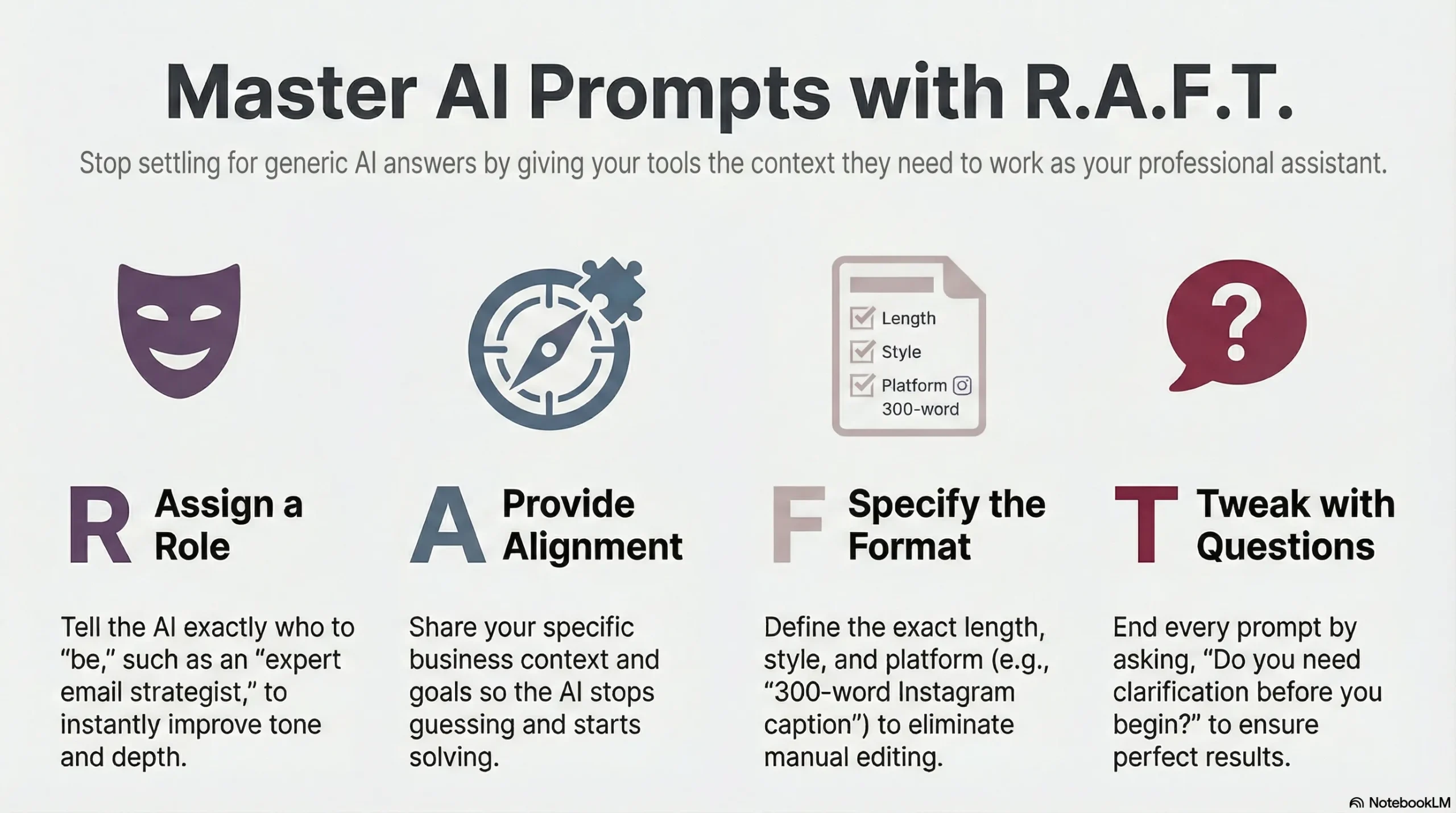
That's exactly why I created the RAFT Prompting Framework, a simple, four-step method designed specifically for entrepreneurs and small business owners who want to get better, more useful results from AI tools without needing a tech background or hours of trial and error. RAFT stands for Role, Alignment, Format, and Tweak, and once you learn it, you'll wonder how you ever tried to use AI without it.
Key Takeaways
- The RAFT framework gives AI the context it needs to give you results that actually fit your business.
- Each letter represents one simple piece of information: Role, Alignment, Format, and Tweak.
- Telling the AI who to "be" (Role) is one of the most powerful things you can do to improve output quality.
- Adding personal context (Alignment) transforms generic answers into advice that fits your specific situation.
- Specifying the Format prevents surprises and saves you editing time.
- The Tweak step invites the AI to ask questions before it starts, which often leads to a much better result.
- You can use RAFT for almost any AI task: writing, strategy, email, social media, planning, and more.
Why Most People Struggle with AI Tools
Let's be real. You've probably heard a lot of buzz about AI. Maybe you've tried it once or twice. Maybe you use it occasionally but feel like you're not quite getting the full benefit. Or maybe you've avoided it altogether because it feels like just one more complicated thing on your already long list.
The truth is, AI tools like ChatGPT, Claude, and others are only as helpful as the instructions you give them. Think of it like hiring a brand-new assistant who is incredibly talented but knows absolutely nothing about you, your business, or your clients. If you walk in and say, "Write me something for social media," that assistant is going to guess. A lot. And the results will show it.
But if you take two extra minutes to say, "Here's who I am, here's who I'm talking to, here's what I need, and here's the format I want it in," that same assistant can produce something genuinely impressive.
That's the heart of the RAFT framework. It's a simple, repeatable structure that gives AI the right information so it can do its best work for you.
The RAFT Prompting Framework, Explained
Let's walk through each letter so you can start using this right away.
R is for Role
The first thing you want to do when prompting AI is tell it who to be. AI tools can adapt their tone, knowledge, and focus based on the role you assign. This single step makes a dramatic difference in the quality of what you get back.
Without a role, the AI defaults to a very general, neutral voice. With a role, it taps into a specific area of expertise.
Here are a few examples:
- "Act as an experienced email marketing strategist."
- "You are a small business coach who works with solo entrepreneurs."
- "Pretend you are a professional copywriter who specializes in the financial services industry."
When you define a role, the AI shifts into that mindset. The vocabulary changes. The depth changes. The tone changes. It's a small tweak that produces noticeably better results.
A is for Alignment
This is where you give the AI context about who you are and what you're trying to accomplish. Without this, even the most talented AI assistant is working blind.
Alignment answers the question: "What does the AI need to know about me before it can help me well?"
Think about it this way. If you hired a marketing consultant, the first thing they'd do is ask questions about your business. What do you sell? Who is your customer? What's your goal? The Alignment step lets you answer those questions upfront, so the AI can skip the guessing and get straight to helping you.
Some examples of strong alignment statements:
- "I am a financial planner who works with women over 50 who are planning for retirement."
- "I run a small jewelry boutique in North Carolina and I'm trying to grow my local customer base."
- "I'm a life coach who helps busy moms reclaim their time and confidence."
The more specific you are, the better your results will be. You don't need to write an essay. A sentence or two is usually enough to point the AI in the right direction.
F is for Format
This is where you tell the AI exactly what you want it to create. Not just "write something" but the specific type of content, the length, the platform, and the style.
This step saves you a lot of editing time because you're not hoping the AI figures out what you want. You're telling it clearly.
Here are some examples of strong format instructions:
- "Write a 300-word Instagram caption that is encouraging and ends with a clear call to action."
- "Create a 5-email welcome sequence for new subscribers, written in a warm and professional tone."
- "Draft a one-page bio for my website that highlights my 20 years of experience and is written in first person."
When you specify the format, you're essentially giving the AI a blueprint. It knows what to build and how to build it. That's a big deal when you need content that's ready to use without a lot of rework.
T is for Tweak
This is my favorite part of the RAFT framework, and it's the step most people skip entirely.
Before you let the AI dive in and start creating, you ask it one simple question: "Do you have any questions before you begin?"
This small step can change everything. A good AI tool will use this opportunity to ask follow-up questions that help it do an even better job. It might ask about your target audience, the purpose of the content, the tone you prefer, or a detail it needs to get the result right.
Think about the last time you gave someone a task and they came back with something completely off-base. Chances are, they needed more information and didn't ask for it. The Tweak step builds that conversation into the process from the start.
It also puts you in a collaborative mindset with the AI, which makes the whole experience feel less like throwing a dart in the dark and more like working with a partner who genuinely wants to get it right.
Putting RAFT Together: A Real-World Example
Your content goes here. Edit or remove this text inline or in the module Content settings. You can also style every aspect of this content in the module Design settings and even apply custom CSS to this text in the module Advanced settings.
Role: Act as a social media strategist who specializes in real estate marketing.
Alignment: I am a real estate agent in the Raleigh-Durham area. I work primarily with first-time homebuyers and want to grow my audience on Facebook and Instagram.
Format: Write a 200-word Facebook post that is friendly and educational, speaks directly to first-time buyers who feel nervous about the process, and ends with a call to action to schedule a free consultation.
Tweak: Do you need any clarification before you begin?
Compare that to simply typing: "Write me a social media post about buying a house."
The first prompt gives the AI a clear picture of who you are, who you're talking to, and exactly what you need. The result will be specific, relevant, and much closer to usable on the first try.
Why RAFT Works Especially Well for Small Business Owners
You're busy. You're wearing multiple hats every single day. You don't have hours to spend tweaking AI prompts or sorting through results that aren't quite right. RAFT is designed to help you get better results faster, without a steep learning curve.
It also gives you a repeatable process. Once you get comfortable with the four steps, you can use this framework for virtually any AI task you tackle, including:
- Writing website copy or blog posts
- Drafting email newsletters or client follow-ups
- Creating social media content across multiple platforms
- Brainstorming ideas for services, offers, or content topics
- Preparing for presentations, workshops, or speaking engagements
- Developing FAQs or customer service scripts
The more consistently you use RAFT, the more natural it becomes. And the better your prompts get, the more time you save and the more valuable AI becomes as a business tool.
A Quick-Reference Card for RAFT
Keep this handy the next time you sit down to use an AI tool:
- R - Role: Tell the AI who to be. Example: "Act as an expert (profession)..."
- A - Alignment: Give context about you and your goal. Example: "I am a (business type) trying to (goal)..."
- F - Format: Be specific about what you want created. Example: "Create a (deliverable) that is (style/length/platform)..."
- T - Tweak: Ask the AI what it needs before starting. Example: "Do you have any questions before you begin?"
Frequently Asked Questions
Do I have to use all four steps every time?
Not necessarily, but using all four will almost always give you better results. At minimum, try to include Role and Alignment. These two steps alone will significantly improve what AI produces for you. The Format and Tweak steps help you refine the output and reduce back-and-forth.
Which AI tools can I use RAFT with?
RAFT works with any AI chat tool, including ChatGPT, Claude, Gemini, Copilot, and others. The framework is about how you communicate with the AI, not which platform you're on. You can use the same four-step approach across all of them.
What if the AI still doesn't give me what I want?
That's completely normal, especially at first. A few things to try: go back and add more detail to your Alignment step, be more specific in your Format instructions, or simply respond to the AI with a follow-up like "That's close, but can you make it sound less formal?" or "Can you shorten this to 150 words?" Prompting is a conversation, not a one-time transaction.
How long should my RAFT prompt be?
There's no magic number, but in general, a few sentences for each step is plenty. You're not writing a novel. You're painting a clear picture. A complete RAFT prompt can often be written in under a minute once you get the hang of it. The goal is clarity, not length.
Can I use RAFT to help with tasks beyond content writing?
Definitely. While RAFT works beautifully for content creation, you can apply it to brainstorming, planning, research, problem-solving, preparing for conversations or meetings, and more. Any time you want useful, relevant output from an AI tool, RAFT gives you a solid starting point.
You've Got the Framework, Now Put It to Work
AI is one of the most exciting tools available to small business owners right now, but only when you know how to use it effectively. The RAFT framework takes the guesswork out of prompting by giving you a clear, repeatable structure that works.
You don't have to be a tech expert. You don't have to spend hours experimenting. You just need to remember four letters: R-A-F-T. Give the AI a Role. Provide Alignment. Specify the Format. And Tweak before it begins.
Start with one task this week. Try writing a social media post, a client email, or a blog intro using the RAFT method. Pay attention to how different the results feel compared to what you've been getting. I think you'll be pleasantly surprised.
And if you'd like to go deeper, I'm here to help. Whether it's a one-on-one session to get you comfortable with AI tools or a done-for-you content strategy that puts these frameworks to work for your business, Targeted Business Support is here to make digital marketing simpler, smarter, and more effective for you.

